
User and operator guide · Operations
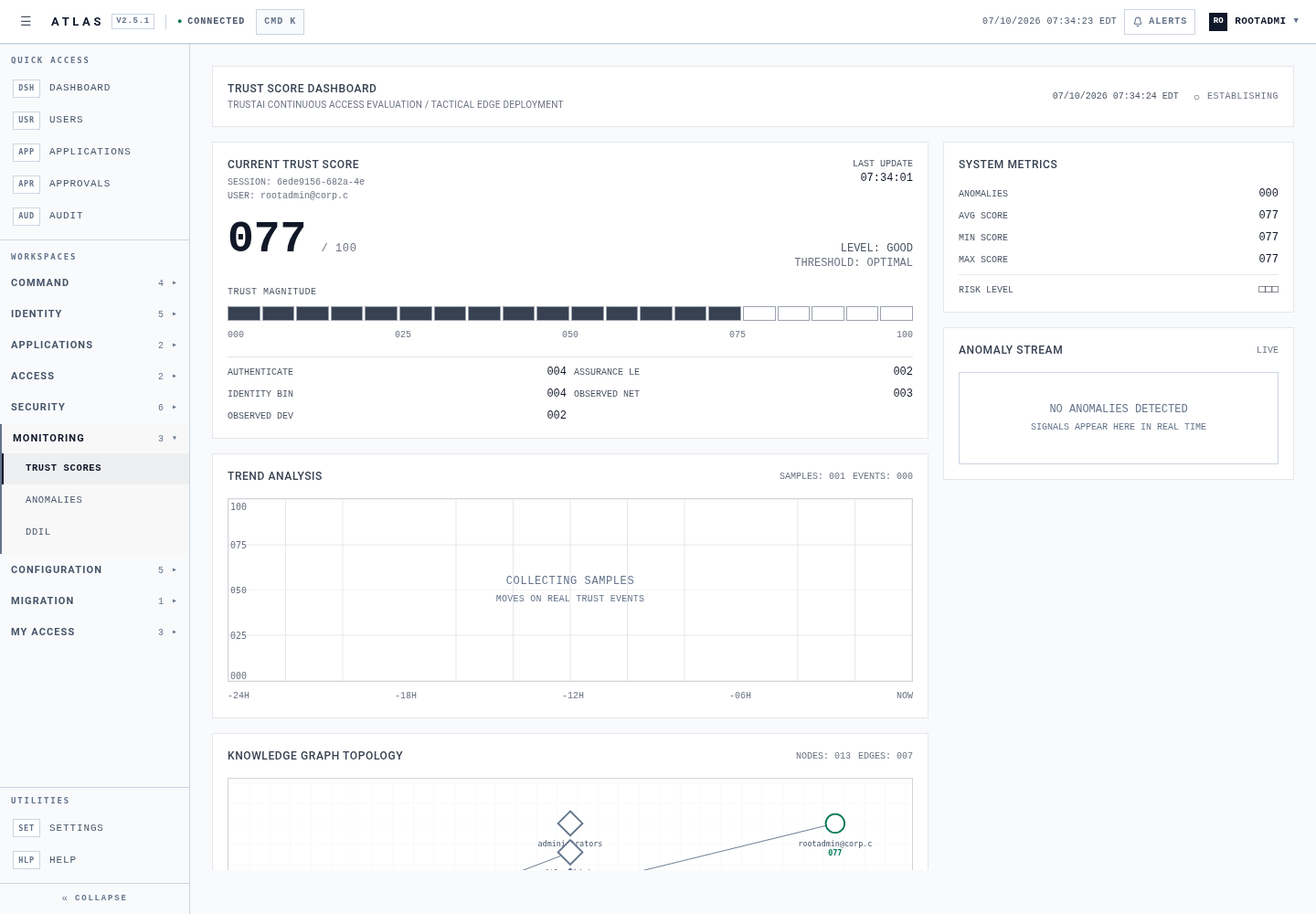
Watch Live Trust Scores And The Dashboard
On this page
Use This Page WhenBefore You BeginWhat You Will DoProcedureOpen the live viewsDrive a trust movement (the cue)Mission Trust ExercisesProduction Control BoundaryPrepare And Promote A Validated Edge BundleVerifyTroubleshootingRelated PagesUse the Trust Scores view and the Dashboard to watch trust scores, anomalies, and the identity topology move in real time — driven only by real events on the stack.
Use This Page When
-
Watch trust scores and anomalies change as sessions are established and challenged.
-
See the live identity topology — which users connect to which groups, apps, and sessions.
-
Demonstrate the trust-movement cue: failed logins re-score a live session while the view shows whether its evidence is advisory or enforcement-capable.
Before You Begin
| Requirement | What to verify |
|---|---|
Access |
TRUST SCORES ( |
Runtime |
The websocket must be enabled: |
Configuration |
At least one real trust producer must fire. An idle stack is quiet by design. |
Evidence boundary |
Atlas proves the live stream and the real topology. Whether the websocket is enabled, and how a score maps to a production action, are deployment-owned. |
|
Important
|
The |
What You Will Do
-
Confirm the websocket is enabled.
-
Open Trust Scores and the Dashboard.
-
Trigger a real producer — a live session, then failed logins against it.
-
Watch the score move and the topology re-flag on both pages.
Procedure
Open the live views
-
Open TRUST SCORES (
/trust-scores). It connects to/ws/trust-scoresand receives typed envelopes:trust_score_update,anomaly_alert, andgraph_update. -
The topology comes from
GET /api/trustscores/graph— real nodes and edges for users, groups, apps, and live sessions, each trust-scored and anomaly-flagged. -
Open the main Dashboard. It renders the same live scores and streams Recent Activity from the audit SSE feed.
Mission Trust Exercises
The showcase provides demo/atlas-ldap-showcase/trustai-exercises.sh as an explicit operator tool. It targets an existing session and submits bounded OCSF or CAEP evidence through an enabled TrustAI source. The runner requires confirmation, prints durable receipt hashes, does not retain raw payloads, and refuses to stack evidence onto a previously exercised session unless --append is specified.
Exercises are advisory and cannot satisfy automatic-enforcement prerequisites or revoke a session. Use a fresh session for each scenario, inspect the ranked plain-language explanations in TrustAI Operations > Investigate, and recover by resolving the evidence and establishing a new strongly authenticated session. There is no score-reset control.
Production Control Boundary
ATLAS_ENABLE_TRUST_PRODUCTION_CONTROLS=true is a deliberate production-action gate. When enabled, Atlas requires an external atlas-incident backend through ATLAS_INCIDENT_GRPC_ADDR; it refuses to use the in-process response store for Trust Score responses. Each proposed scoped response creates a Trust Score incident with the immutable evidence ID before an operator can approve it.
The shipped TrustAI bundle remains advisory-only. Production control mode does not promote, calibrate, or authorize a model; those approvals require the independently labeled operational evaluation and signed promotion contract described in TrustAI Architecture.
-
Establish a victim session by signing in as a test user.
-
From another client, submit 3 failed password logins against that user (the wrong-password drill).
-
Watch the victim session re-score on both pages in real time. With the shipped model the result remains advisory. Automatic revocation occurs only when an independently evaluated, calibrated, signed bundle is promoted for enforcement and the corroboration, persistence, protected-session, and revocation-budget gates also pass.
Prepare And Promote A Validated Edge Bundle
Use the bundle CLI to verify a candidate and produce the exact material an independent validator must approve. The candidate manifest must declare artifacts.validation_evaluation; the command reads that artifact through the signed manifest rather than accepting an operator-selected report path.
python3 scripts/dev/manage-trustai-bundle.py verify \
  --bundle /srv/trustai/bundles/candidate-v2 \
  --public-key /etc/trustai/keys/bundle-signer.pub

python3 scripts/dev/manage-trustai-bundle.py validation-bindings \
  --bundle /srv/trustai/bundles/candidate-v2 \
  --public-key /etc/trustai/keys/bundle-signer.pub \
  --authority-id atlas-east \
  --site-id site-alpha \
  --population-id workforce \
  --context edge-authentication \
  > /secure-transfer/candidate-v2-bindings.json
Transfer the deterministic bindings and unsigned evaluation to the separate validation authority under the deployment’s approved process. The release CLI intentionally has no command that accepts a validator private key or signs a validation receipt. The validator and its approver create atlas.trustai.validation-receipt/v2 outside the release authority. After the receipt is returned, add it to the manifest and checksums and sign the complete bundle with the distinct bundle-signing key.
Promotion requires the validator public-key pin and the same exact scope. Advisory promotion does not require these v2 options.
Run enforcement promotion in an environment that installs src/trustai_scoring/requirements-edge-onnx.txt. Promotion loads and executes the signed ONNX artifact, and it fails closed when the NumPy/ONNX Runtime dependencies or the exact model contract are unavailable.
python3 scripts/dev/manage-trustai-bundle.py promote \
  --bundle /srv/trustai/bundles/candidate-v2 \
  --active-link /srv/trustai/active \
  --history /var/lib/trustai/promotion-history.json \
  --public-key /etc/trustai/keys/bundle-signer.pub \
  --mode enforcement \
  --validator-public-key /etc/trustai/keys/independent-validator.pub \
  --authority-id atlas-east \
  --site-id site-alpha \
  --population-id workforce \
  --context edge-authentication
Rollback re-verifies its target. Supply the same validator key and scope because the prior target may itself be enforcement-capable:
python3 scripts/dev/manage-trustai-bundle.py rollback \
  --active-link /srv/trustai/active \
  --history /var/lib/trustai/promotion-history.json \
  --public-key /etc/trustai/keys/bundle-signer.pub \
  --validator-public-key /etc/trustai/keys/independent-validator.pub \
  --authority-id atlas-east \
  --site-id site-alpha \
  --population-id workforce \
--context edge-authentication|
Important
|
CLI promotion alone does not grant gateway enforcement authority. The Python scorer must also have the exact runtime scope, three distinct public-key pins, a fresh externally signed validator-status document, and a persisted status-sequence head described in TrustAI Architecture. Its enforcement ONNX outputs must remain equal to the confidence recomputed from the signed v2 calibration parameters, inclusive operating threshold, and exact Gateway restart clears in-memory enforcement authorization. After every restart, explicitly promote the verified bundle to enforcement again; loading it or finding it marked active in the operations store does not restore enforcement authority. Legacy v1 evaluation evidence is advisory-only. The shipped bundle and current AIO deployment also remain advisory: they have no validation receipt v2, environment-specific accreditation, ATO, or automatic-denial authority. Source changes require an AIO rebuild before they can appear in the running container. |
Verify
| Check | Passing result |
|---|---|
Live topology |
With the websocket enabled and a session live, the graph renders that session as a trust-scored node. |
Movement |
Three failed logins produce a visible |
Recent Activity |
The Dashboard’s Recent Activity shows the corresponding audit rows from the SSE feed. |
Assurance state |
The view labels the shipped bundle |
Quiet when idle |
With no producer active the stream is silent. That is correct behavior — Atlas streams real events only. |
Troubleshooting
| Symptom | Likely cause | Operator action |
|---|---|---|
Pages render but never update. |
|
Enable it in the gateway configuration and restart the gateway. |
The stream connects but stays quiet. |
No real producer has fired. |
Drive a session or the wrong-password drill. An idle stack is silent by design. |
|
The session lacks |
Obtain the capability, then reopen the page. |
The score moved but the session was not revoked. |
One or more enforcement gates did not pass; the shipped model is intentionally advisory-only. |
Expected. Inspect the evidence reason, model assurance, freshness, coverage, corroboration, protected-session state, and shared revocation circuit. A threshold crossing alone must not revoke. |
Related Pages
-
Monitoring — TrustAI health as an operational signal.
-
Run The Access Collapse Demo — the end-to-end wrong-password drill and victim-session walkthrough behind the trust-movement cue.
-
Read The Live Audit Log — the source of the Dashboard’s Recent Activity stream.
-
Manage Authorization Policies — the step-up and revocation posture a falling trust score can trigger.