
User and operator guide · Operations
ICAM User Workflow Guide
On this page
Before You StartRole And Attribute GatesWorkflow MapConfigure Identity Intake DefaultsConfigure DD2875 Approval Routing In Workflow ManagerBefore You BeginReview The Current DD2875 RouteEdit Approval StepsRouting RulesVerify A Saved DD2875 RouteWhen To Use A New StepEvidence To PreserveStart RegistrationUpload Or Correct Proofing EvidenceIntake Package CaptureRegistration Evidence ReviewPhoto And ID Evidence UploadThumbnail Inspection, Authorized Downloads, And Unavailable ContentReview Changes And AuditIdentity ReviewPackage Diff And Field HistoryDownload And Field-Change AuditGovernance ReviewAudit And ICAM Evidence ReviewUse this guide when an operator needs to start a registration, attach or correct a DD2875/SAAR, photo, ID, or other proofing artifact, review changes and audit evidence, approve workflow steps, or configure reusable workflow templates.
Atlas workflows are draft-first and evidence-gated. A screen message is not enough for an operational record. Confirm the owning queue, evidence hash, audit row, or exported evidence package before citing a workflow result.
Before You Start
You need:
-
an authenticated operator session through the Atlas gateway
-
fresh AAL2 or better before mutating registration, proofing, approval, governance, template, or publish state
-
reviewer authority when approving another user’s registration or access request
-
subject identifiers, manager or sponsor context, organization context, requested systems, justification, and expected approver chain
-
source DD2875/SAAR, training, sponsor, CAC/PIV, photo ID, government ID, or other proofing artifacts under the deployment’s document custody rules
-
access to
/audit,/identity/evidence,/governance, or/icamevidence views when the result will be used for review -
explicit authorization before downloading source, identity, photo, biometric, or proofing content from an evidence packet
Role And Attribute Gates
Atlas shows ICAM, identity, workflow, package, artifact, adapter, migration, audit, and role-assignment controls only when the Atlas authorization service allows the current user.
-
Confirm the operator has the assigned role for the work, such as
identity-reader,identity-operator,identity-reviewer,identity-auditor,icam-reader,icam-workflow-operator,icam-adapter-operator,icam-migration-operator, or an approved break-glass administrator role. -
Confirm required attributes, organization, mission, clearance, subject ownership, reviewer assignment, package type, artifact sensitivity, and session assurance match the action.
-
Complete fresh AAL2 step-up before creating or updating users, applying role or group changes, reviewing proofing packages, downloading protected artifacts, running ICAM workflows, operating adapters, managing workflow templates, or changing migration state.
-
Use the user detail
Assigned Authorizationevidence to see the target user’s roles, groups, capability decisions, PDP policy version, policy hash, request hash, decision expiry, decision hash, and evidence hash. -
If a route, menu item, or button is missing, verify the operator’s role and attribute assignment instead of bypassing by direct URL.
-
If direct URL or API access is denied, open
/auditand confirm the denied authorization row records actor, route or capability, attempted resource, requested subject when applicable, reason, AAL, request context, outcome, PDP policy version, policy hash, request hash, decision expiry, PDP decision hash, and evidence hash.
Generic operator access does not grant ICAM authority by itself. ICAM and identity actions require the specific assigned roles and attributes configured for the deployment.
Workflow Map
| Workflow stage | Primary routes | Operator outcome | Evidence to confirm |
|---|---|---|---|
Start registration |
|
A field-first draft is completed, optional package values are used to fill missing fields, and the validated preview is committed into a pending user plus proofing packet. |
Draft evidence hash, package fill result, directory precheck hash, lifecycle preview hash, committed pending user id, proofing session id. |
Upload or correct proofing evidence |
|
A DD2875, Federal SAAR, photo ID, government ID, CAC/PIV image, biometric, or other proofing artifact is uploaded into compact checklist lanes, inspected, corrected when allowed, and carried into the committed proofing packet. |
Package id, evidence type, checklist lane status, artifact hash, ID-photo thumbnail or preview status, disabled download reason or authorized-download audit row, unavailable-content note, field audit row, evidence packet count, reviewer note, action result. |
Review changes and audit |
|
Profile, group, access, lifecycle, credential, session, request, and ICAM evidence are reviewed before action. |
Preview diff, effective-access impact, request history, evidence hash, audit event, ICAM evidence entry. |
Approve workflow steps |
|
Reviewer actions move proofing, credential, access, governance, or response workflows forward only when gates pass. |
AAL2 reviewer gate, separation-of-duties result, evidence present, decision reason, updated status, audit trail. |
Manage DD2875 approval routing |
|
A workflow administrator configures the approval steps, approver capability, and evidence gate used for new DD2875 or Federal SAAR proofing requests. |
Workflow definition id, package type, step count, required capabilities, evidence gates, saved routing audit row, and new proofing packet approval chain. |
Configure workflow templates |
|
A reusable application, access package, or response template is selected, cloned, validated, and published only after readiness gates pass. |
Template id, owner, authority mode, package or readiness hash, approval policy, publish or playbook status. |
Use /identity/create for optional DD2875 and Federal SAAR package capture during identity registration; the package entitles evidence-gated access scopes and is never required to create the user. The /new-request route is an access-request surface; do not treat /new-request by itself as submitted DD2875/SAAR evidence unless the gateway has produced a corresponding proofing, request, audit, or evidence record.
Configure Identity Intake Defaults
Use Settings when the deployment default identity category or system family needs to change before operators start new registrations.
-
Open
/settingswith a role allowed to manage settings and a fresh AAL2 session. -
Open the
Securitytab. -
In
Identity Intake Defaults, choose the default category:-
DoD (DD2875)for DoD systems where DD2875 is the recommended access evidence package by default. -
Federal (SAAR)for Federal systems where Federal SAAR is the recommended access evidence package by default. -
Civilian workforcewhen the workforce path is primary; Atlas still recommends DD2875 on DoD systems and Federal SAAR on Federal systems.
-
-
Choose the system family,
DoD systemorFederal system. -
Review the
Create user defaultexplanation. It should name the package evidence recommended for evidence-gated access on the next new identity draft. Packages never block creating the user; they entitle evidence-gated compartments, groups, and entitlements, and missing evidence converts those selections into pending access requests at commit. -
Select
Save. -
Open
/identity/createand open theEvidence (optional)lane and confirm theSystem-derived intakepanel shows the expected default category, system family, recommended package, rationale, and next action.
The operator still does not choose the intake type on the create page. The Settings default supplies the starting category, and stronger evidence such as CAC/PIV data or uploaded package evidence can refine the system-derived decision.
Configure DD2875 Approval Routing In Workflow Manager
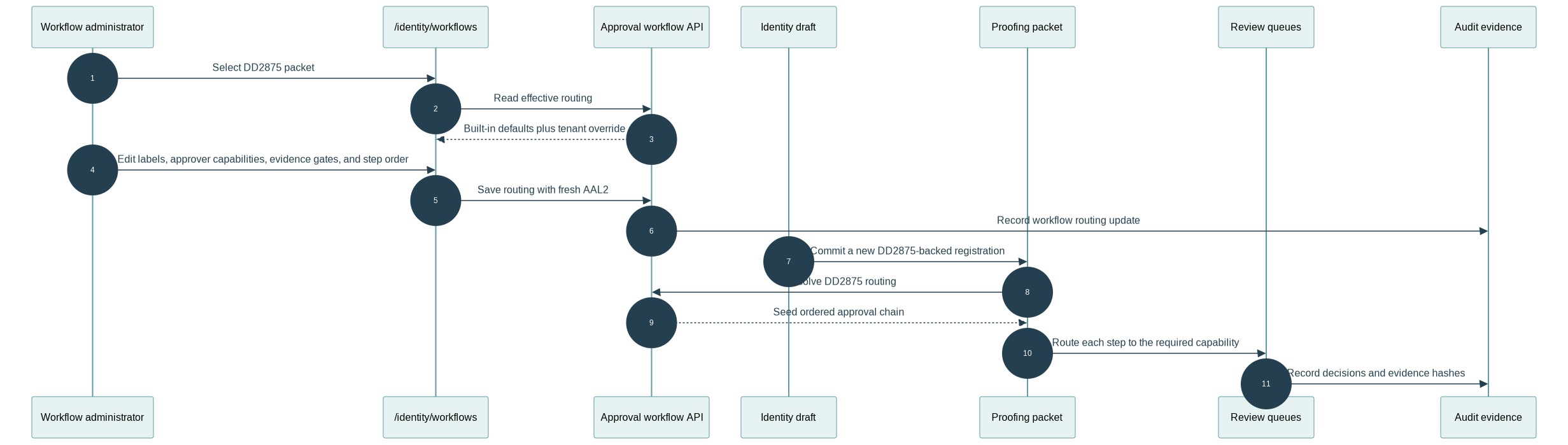
Use /identity/workflows when the deployment needs to control how DD2875 and Federal SAAR proofing requests move through approval. This is the workflow manager for identity package routing. It does not create the DD2875 package itself; it defines the ordered approval chain that Atlas applies to new proofing sessions after a registration draft is committed.
The built-in DD2875 route has two approval steps:
-
Supervisor / resource-owner review, requiring theidentity.registrations.reviewcapability and the DD2875 evidence gate. -
ISSO security review, requiring theidentity.proofing.isso.approvecapability.
Federal SAAR has the same routing model with sponsor/supervisor review followed by security and privacy review. A tenant can keep the built-in defaults or save tenant-scoped routing overrides.
Before You Begin
You need:
-
an authenticated operator session
-
access to the
Workflow Managerroute in the Identity navigation -
the
identity.workflow.templates.readcapability to view routing -
the
identity.workflow.templates.managecapability and fresh AAL2 to save routing -
the local approval policy for supervisor, resource-owner, ISSO, security manager, privacy reviewer, and IAM operator responsibilities
-
a decision about whether DD2875 evidence, Federal SAAR evidence, CAC/PIV evidence, or no evidence gate is required at each approval step
Use the route only for approval routing. Use /identity/create for package capture, package XML generation, and registration draft work. Use /identity/registrations and /approvals for reviewer decisions on an individual proofing packet.
Review The Current DD2875 Route
-
Open
/identity/workflows. -
Confirm the left package list includes
DD2875 packetorDoD DD2875 account request. -
Select the DD2875 package type.
-
Review the current step list.
-
Confirm each approval step has a clear label, required approver capability, and evidence gate.
-
Confirm the default DD2875 route still separates the supervisor/resource-owner review from the ISSO security review unless the deployment has approved a different chain.
Expected result: the page shows the effective tenant routing for DD2875. If no tenant override exists, Atlas shows the built-in route. If a tenant override exists, the page shows the saved route.
Edit Approval Steps
-
Select
Add approval stepwhen the deployment needs another review gate. -
Enter a short step label that names the reviewer responsibility, such as
Mission owner review,ISSO security review, orIAM fulfillment approval. -
Choose the approver capability:
-
identity.registrations.reviewfor supervisor, sponsor, resource-owner, or identity-reviewer style steps. -
identity.proofing.isso.approvefor ISSO, security manager, or information-system-owner style DD2875 security approval. -
identity.roles.assignfor IAM operator fulfillment or role-assignment review.
-
-
Choose the evidence gate:
-
DD2875 packetwhen this step must not pass without DD2875 evidence. -
Federal SAAR packetwhen the package type is Federal SAAR. -
CAC/PIV evidencewhen the reviewer must verify credential evidence. -
No evidence gateonly when the step is procedural and does not require a package artifact.
-
-
Use move up or move down to put the steps in the desired order.
-
Use remove only when the deployment policy no longer requires that approval gate.
-
Select
Save routing. -
Confirm the success message names the package type and approval-step count.
Expected result: new DD2875 or SAAR requests of the selected package type route through the saved approval steps. Existing proofing packets keep the chain they were seeded with unless the deployment rebuilds or reissues that packet under a separate approved procedure.
Routing Rules
| Rule | Meaning |
|---|---|
Tenant-scoped routing |
Saved definitions apply to the caller’s tenant boundary. Another tenant can keep the built-in defaults or its own override. |
Future requests |
Saved routing is used when a new proofing session is created from a committed identity draft. |
Approval steps only |
Steps whose kind is |
Capability required |
Every approval step must name a required approver capability. Atlas rejects a saved route without at least one approval step or with an approval step that lacks a capability. |
Fresh AAL2 to manage |
Viewing routing is a read action; saving routing is a sensitive management action and requires fresh AAL2. |
Separation of duties |
The DD2875 default route separates supervisor/resource-owner review from ISSO review by using distinct capabilities. Reviewer decisions still enforce the proofing and approval gates for the packet. |
Evidence gate |
An evidence gate declares which package evidence the reviewer must consider before the step is complete. |
Verify A Saved DD2875 Route
-
Open
/auditand search for the workflow routing update. -
Confirm the audit entry records the operator, capability, package type, step count, decision, and timestamp.
-
Start a new DD2875-backed identity draft from
/identity/create. -
Attach or generate the required DD2875 package evidence.
-
Validate and preview the draft.
-
Commit the draft.
-
Open
/identity/registrations. -
Select the new proofing packet.
-
Confirm the approval chain matches the saved DD2875 route.
-
Confirm the first reviewer action is available only to a user with the required capability and fresh assurance.
-
Confirm each follow-on step remains pending until the prior required step and evidence conditions are satisfied.
Expected result: the saved route controls the approval chain for the new DD2875 proofing packet, and each decision is traceable through /audit, /identity/evidence, or /icam evidence according to the deployment evidence workflow.
When To Use A New Step
| Situation | Recommended routing action |
|---|---|
The system owner must approve every privileged DD2875 before ISSO review. |
Add a supervisor/resource-owner style step before the ISSO step. |
Security and privacy reviews are separate in the deployment. |
Keep the ISSO/security step and add a privacy-review step with the appropriate approver capability when the deployment maps that responsibility. |
IAM fulfillment should confirm role assignment after security approval. |
Add an IAM operator fulfillment step after the ISSO step. |
A DD2875 package must be attached before supervisor review. |
Keep the DD2875 evidence gate on the first review step. |
A procedural review does not need a package artifact. |
Use |
Evidence To Preserve
| Evidence item | Why it matters |
|---|---|
Workflow routing update audit row |
Shows who changed the route, when, and under which capability. |
Saved definition |
Shows package type, label, ordered steps, approver capabilities, and evidence gates. |
Step count and order |
Shows the chain reviewers must follow for new proofing packets. |
New proofing packet approval chain |
Shows the saved route was applied to an actual DD2875-backed registration. |
Reviewer decision audit rows |
Shows each approval step was decided by an authorized reviewer with the required assurance. |
DD2875 evidence hash |
Shows the route was tied to a package artifact or generated XML evidence rather than a screen-only note. |
Use the workflow manager for approval routing. Source-document custody, approval policy, proofing evidence, reviewer actions, evidence hashes, and audit records remain the operational proof for the DD2875 package.
Start Registration
Use /identity/create when an operator is creating a workforce, mission, contractor, guest, or service-account identity.
-
Sign in and complete step-up if the current session is below AAL2.
-
Open
/identity/create. -
Confirm the page shows system-derived, field-first intake. The operator does not choose an intake type manually.
-
Enter username, email, EDIPI or employee id when required, name, organization, org unit, position, manager, profile source, and requested groups before relying on package extraction.
-
Use lookup-backed fields where available. Review source, authority mode, disabled reason, and evidence hash before selecting a lookup result.
-
Use the DD2875 and SAAR package workbench only when the current system-derived decision or local workflow calls for that evidence:
-
when the requester supplied an official DD2875 or Federal SAAR source file, choose
Uploadin the matching lane, select the file, and then selectUpload DD2875orUpload Federal SAAR -
when no source file exists yet, choose
Complete DD2875orComplete Federal SAARin the required lane, complete the modal form workbench, save a draft when review is not finished, then selectCreate XML Package -
when a package artifact already exists, choose
Edit DD2875orEdit Federal SAARto reopen the modal with current ledger fields, update the structured values, and regenerate XML when allowed -
download package XML or uploaded source content only after an artifact exists and only when the current role, session assurance, and custody rules permit it
-
review the package id, artifact hashes, compact checklist lanes, diff rows, workflow stages, and audit trail
-
select
Fill Missing From Packageonly after reviewing the extracted values; Atlas fills empty intake fields and leaves operator-entered values for manual review -
use
Editon an attachment to correct status, document number, expiration, or review notes
-
-
Choose
Create Draft. -
Choose
Validate.Resolve duplicate username, duplicate email, duplicate EDIPI, missing profile-source, missing manager, missing group, or secret-looking field blockers before continuing.
-
Choose
Preview.Review birthright groups, application suggestions, lifecycle effects, approval reference, rollback reference, and evidence hash. Preview is no-write review; it is not account activation.
-
Choose
Commitonly after validation and preview pass. -
Open
Registrationsfrom the action bar or go to/identity/registrations.
Expected result: Atlas creates a PENDING identity record and a proofing packet. The user is not fully active until proofing evidence and reviewer approval gates pass.
Upload Or Correct Proofing Evidence
Use /identity/create for initial DD2875 and Federal SAAR package capture. Use /identity/registrations when the package has already been committed into a proofing packet, when the reviewer needs additional evidence, or when the evidence is a photo, ID image, biometric sample, training artifact, sponsor artifact, or other proofing file.
Intake Package Capture
-
Open
/identity/create. -
Confirm the DD2875 and SAAR package manager is visible.
Choose The Package Path
| What the operator has | Action | What Atlas records |
|---|---|---|
Official DoD DD2875 file |
Select |
Source artifact metadata, artifact hash, extracted fields when available, package diff rows, and upload audit row. |
Official Federal SAAR file |
Select |
Source artifact metadata, artifact hash, extracted fields when available, package diff rows, and upload audit row. |
No package file yet |
Select |
A package form draft that can be saved, reopened, generated as XML, and audited. |
Existing package needs correction |
Select |
Updated package fields, field history, diff rows, and correction audit rows. |
Complete The Modal Form
-
In the modal form workbench, use the left section rail for
Request,Requester,Organization,System/Access,Sponsor/Owner,Security Validation, andReview/Part IV. -
Use the completion meter, section missing counts, and right-side required-field summary to jump directly to incomplete fields.
-
Use type-ahead fields for requester, supervisor, sponsor, information owner, security manager, organization, office symbol, system, and requested access when the deployment exposes governed lookup sources.
-
Select a lookup result only after reviewing its source and evidence. Atlas fills mapped empty fields and skips populated fields unless the operator deliberately enables overwrite for the next apply.
-
Use fast-fill actions for intake values, standard defaults, and safe suggestions. Review every changed field before creating XML.
-
Confirm DD2875 fields use stage labels rather than a simple required/optional split:
-
Required nowfields must be complete before Atlas creates the requester-stage XML package. -
Required in Supervisor,Required in Security,Required in Part IV, orRequired in Final Reviewfields can be completed later, but they remain visible as future-stage blockers before final package approval. -
Conditionalfields become required only when the related answer applies, such as contractor or privileged-access fields. -
Optionalfields are limited to local comments, deployment extension fields, or genuinely non-baseline notes.
-
-
Use the help control beside each DD2875 field label when a field is unclear. The help text explains what the operator, sponsor, security manager, or provisioning reviewer is expected to provide without exposing cryptographic signatures or protected log internals.
-
When a required DD2875 field legitimately does not apply, enter a not-applicable value with a reason when the field allows it, such as
N/A - civilian employee has no rank. Atlas does not treat a bareN/Aas complete. -
Select
Save Draftwhen the package form needs more review. Confirm the package diff and audit preview show the saved field values before leaving the modal. -
Review every prefilled value, correct current requester, organization, system, access, justification, and sponsor values, then select
Create XML Package. Continue supervisor, owner, security-validation, signature/date, and deployment-specific Part IV completion through the workflow before final package approval.
Verify Package Evidence
-
Confirm the generated XML attachment appears in the same lane with an artifact hash and download action. The XML attachment satisfies the package blocker only for the matching DD2875 or Federal SAAR lane.
-
Review the package completeness state.
Draft readymeans current-stage fields are complete and XML can be generated; it does not mean supervisor, security, Part IV, or final-review fields are complete. -
Review the compact evidence checklist lanes for package status, required evidence, warnings, and blockers.
-
Review the package diff. Extracted, wizard-entered, generated XML, submitted, and later-edited values appear beside current values so the operator can see what the package can provide and what changed.
-
Select
Fill Missing From Packagewhen empty identity, organization, sponsor, manager, or access fields can safely be populated from the package. Review every filled field before validating the draft. -
Use
Editon the attachment when the uploaded or generated package needs status, document number, expiration, label, or review-note correction. -
Confirm the audit trail records the upload, XML generation, download when used, and every corrected field with actor, timestamp, outcome, and evidence hash.
-
Confirm final DD2875 submission or approval is not available until every applicable stage-required field is completed or marked not applicable with a reason.
-
Continue the registration draft only after the package evidence and required identity fields look correct.
Atlas maintains DD2875 field-audit evidence for the configured package profile. Auditors can use the validation evidence bundle to confirm each DD2875 baseline field is mapped to an Atlas field, XML path, required stage, help explanation, validation behavior, and workflow blocker state.
The DD2875 and Federal SAAR lanes are separate. A CAC/PIV registration can still carry DD2875, SAAR, ID photo, biometric, or other artifacts as attachments; those attachments do not change the primary CAC/PIV identity path.
Registration Evidence Review
-
Open
/identity/registrations. -
Select the proofing packet for the pending user.
-
Review the selected packet header for subject email, justification, trust context, current status, evidence packet count, and reviewer action availability.
-
Use the compact evidence checklist lanes to identify missing package, photo, ID, signature, training, sponsor, or custody evidence before attaching more files.
-
In
Attach evidence, setEvidence typetoSAAR/DD2875. -
Choose the DD2875/SAAR file approved for this environment.
-
Select
Attach Evidence. -
Confirm the evidence packet now lists the artifact and the status message reports a successful attach.
-
Add a reviewer note that names what was reviewed or what remains missing.
If the DD2875/SAAR is incomplete or incorrect:
-
Select the packet.
-
Use
Request Infowhen a missing artifact, missing signature, unreadable file, or incomplete justification can be corrected without rebuilding the identity draft. -
Use
Return To Draftwhen identity, access, organization, approver routing, or profile-source data must be corrected before proofing continues. -
Attach the corrected
SAAR/DD2875artifact after the requester or operator supplies it. -
Review the updated evidence list before taking an approval action.
Photo And ID Evidence Upload
-
Open
/identity/registrations. -
Select the proofing packet for the pending user.
-
Confirm the current session, role, and packet state allow evidence upload.
-
In
Attach evidence, select the closest deployment-approved evidence type, such asID Photo,Government ID,CAC/PIV,Biometric,Training,Sponsor, orOther proofing evidence. -
Choose the file from the approved custody location. Do not upload local copies that bypass the deployment’s custody or redaction rules.
-
Select
Attach Evidence. -
Confirm the evidence packet lists the file name, evidence type, artifact reference, artifact hash, upload timestamp, packet evidence count, and checklist lane status.
-
For
ID Photoevidence, confirm the thumbnail preview renders for the selected packet before the reviewer relies on the upload. -
Add a reviewer note that names the artifact inspected, any redaction or custody limitation, and the decision the artifact supports.
Use Other proofing evidence only when the deployment has not exposed a more precise type. Do not label a photo, government ID, CAC/PIV image, or biometric sample as SAAR/DD2875 unless the file is actually part of that package.
Thumbnail Inspection, Authorized Downloads, And Unavailable Content
-
Inspect the thumbnail or preview before approval whenever the evidence view provides one.
-
Confirm the thumbnail or preview is legible enough for the review purpose. Check subject match, document class, visible expiration or issue context when applicable, redaction state, file type, page count, and whether the image is cropped or unreadable.
-
Do not approve from file name, file extension, or upload status alone.
-
If the thumbnail or preview is not available, treat the artifact as unavailable content until another authorized review path confirms it.
-
For ID-photo evidence, use the thumbnail preview in the selected packet to confirm the uploaded image is visible, correctly associated with the subject, and not cropped beyond review use.
-
Use an authorized download only when the current role, session assurance, need-to-know, and custody rules permit it.
-
When a download action is disabled, read the visible disabled reason and resolve the named issue before attempting another download.
-
After a download, confirm
/auditrecords the download or denied-download event with actor, timestamp, artifact reference, subject or packet id, outcome, and evidence hash. -
If download is denied or the content remains unavailable, record that state in the reviewer note and use
Request Info,Return To Draft, orRejectaccording to the packet issue. -
Preserve the audit row or export that proves whether the reviewer inspected a thumbnail, used an authorized download, or could not access the content.
Unavailable content is not proofing evidence by itself. It is an evidence-handling state that must be resolved, explained, or accepted under local review policy before an approval action cites that artifact.
Approval remains blocked when no proofing evidence artifacts are attached. Atlas stores package metadata, field history, workflow state, artifact references, and hashes in the proofing ledger; production source documents and biometric material remain under environment custody.
Review Changes And Audit
Use review screens before any approval or apply action.
Identity Review
-
Open
/identity. -
Select the user or pending registration.
-
Review
Summary,Timeline,Lifecycle,Credentials,Sessions, andEvidence. -
If the user detail panel shows
Audit evidence degraded, continue reviewing the non-audit panes that are still loaded, but treat authoritative audit review as blocked until an auditor opens/auditand resolves or acknowledges the strict verification failure. -
Record the degraded reason shown in the console in the reviewer note or escalation ticket. Do not copy raw signatures, key material, or protected audit log contents into the note.
-
For group or attribute changes, choose
PreviewbeforeApply. -
Review the diff, effective-access impact, blocker list, external writeback boundary, and evidence hash.
-
For role or group changes, enter the operator justification before preview. For privileged ICAM, identity, audit, security, artifact-download, workflow, or administrator roles, also enter the approval or break-glass reason required by local policy.
-
Apply only when the preview is ready and the action gate shows AAL/RBAC readiness.
-
Open
/identity/evidencefor the selected user (it opens the Evidence tab of the user detail) to confirm evidence rows are present.
Package Diff And Field History
-
Open the package manager on
/identity/createbefore commit, or the proofing packet on/identity/registrationsafter commit. -
Review the DD2875 and Federal SAAR attachment lanes separately.
-
In
Diff Review, compare uploaded or extracted values with current values. -
In
Audit Trail, confirm who uploaded or changed a field, when the action happened, and which evidence hash was generated. -
Treat locked submitted fields as read-only unless the current workflow step and reviewer authority explicitly allow correction.
Download And Field-Change Audit
-
Open
/auditfor the subject, packet id, artifact reference, or reviewer action. -
Confirm every evidence upload, thumbnail or preview inspection when recorded, authorized download, denied download, unavailable-content result, field correction, reviewer note, and workflow decision has an audit row.
-
For downloads, confirm the row records actor, role or authority context, timestamp, artifact reference, subject or packet id, outcome, and evidence hash.
-
For field changes, compare the package diff and field history against the audit row. Preserve previous value, current value, actor, timestamp, reason, reviewer note, and evidence hash.
-
Treat missing audit rows as a review blocker. Use
Request Info,Return To Draft, or an auditor follow-up instead of relying on screenshots or local files alone.
Governance Review
-
Open
/governance. -
Use request filters for
Pending,Conflicts,History gaps, andEvidence gaps. -
Select
Reviewon the request before deciding. -
Confirm subject, entitlement ids, SoD state, decision history, and evidence.
-
Do not approve a request with unresolved SoD conflicts.
Audit And ICAM Evidence Review
-
Open
/auditwhen you need the event trail for a specific subject, action, or workflow. -
Open
/icam. -
Use
Operationsto confirm owner service readiness. -
Use
Evidenceto inspect latest ICAM artifacts, claim boundary, control map entries, and hashes. -
Keep audit exports, ICAM evidence, and UI screenshots tied to the same run or environment.
Reviewer And Auditor Workflow
Reviewer Flow
-
Open the assigned queue:
/identity/registrationsfor proofing packets,/approvalsfor approval work, or/governancefor governed entitlement decisions. -
Select one work item and confirm the packet header shows subject, sponsor or manager context, requested systems, organization, evidence count, blocker state, and reviewer authority.
-
Use the reviewer action strip near the packet header to see which actions are currently available before writing the note or deciding.
-
Inspect compact DD2875/SAAR package lanes, photo or ID evidence, thumbnails or previews, disabled download reasons, authorized-download audit rows, unavailable-content notes, package diff, and field-change history before deciding.
-
Confirm the packet has enough evidence for the specific decision. A generic upload success message is not enough.
-
Record a reviewer note that states what was inspected, what was unavailable or denied, and why the selected action is appropriate.
-
Choose
Approve,Request Info,Return To Draft,Reject,Deny,Revoke,Withdraw, orDelegateonly when the current screen shows the action is available and no required blocker remains. -
Re-open the packet, queue,
/identity/evidence, or/auditto confirm status, audit trail, and evidence hash after the action.
Auditor Flow
-
Start from
/audit,/identity/evidence,/governance, or/icamaccording to the control or case under review. -
Filter by subject, packet id, artifact reference, reviewer, decision action, or time window.
-
Reconstruct the chain of custody: upload, thumbnail or preview inspection, authorized download or denied download, unavailable-content handling, field correction, reviewer note, decision, and final status.
-
Confirm every cited artifact has an evidence hash or artifact reference and every cited action has an audit row.
-
Confirm any unavailable content was either resolved through an authorized review path or clearly excluded from the approval rationale.
-
Export or preserve only the audit and evidence records permitted by local custody rules, and keep them tied to the same run, environment, and time window.
Approve Workflow Steps
Reviewer actions require a current operator session, fresh assurance, and the right reviewer authority.
Registration Approval
-
Open
/identity/registrations. -
Select a packet.
-
Review the action strip near the packet header for available reviewer actions and disabled reasons.
-
Confirm the action gate reports an AAL2 reviewer session.
-
Confirm at least one proofing evidence artifact is attached.
-
Enter a reviewer note.
-
Choose one action:
-
Approveverifies attached proofing evidence and activates a pending user when all gates pass. -
Request Infokeeps the packet in review while recording what is missing. -
Return To Draftsends the packet back for identity or access correction. -
Rejectdenies the registration and records the rejection reason.
-
Atlas blocks self-approval and approval without proofing evidence.
Approval Queue
-
Open
/approvals. -
Filter or search the queue.
-
Select a request.
-
Review requester, systems, trust context, clearance, groups, supporting evidence, and recent activity.
-
Enter a review note.
-
Choose
Approve,Reject,Request Info, orDelegate. -
Confirm the queue refreshes and the request status changes.
Use /approvals for proofing and credential approval queues. Use /governance when the decision is an entitlement, access package, certification, SoD, or fulfillment decision.
Governance Decisions
-
Open
/governance. -
Select
Requests,Approvals,Packages,Certifications, orSoDaccording to the work item. -
Use
Reviewbefore deciding. -
Choose
Approve,Deny,Revoke, orWithdrawonly when the request state allows it. -
Confirm SoD conflicts are clear before approval.
-
Confirm fulfillment outbox or revoke intent exists when the decision should trigger lifecycle work.
ICAM Response Steps
-
Open
/icam. -
Select
Response. -
Instantiate a response template when a new playbook is needed.
-
For playbooks, use
Validate,Submit,Approve,Publish, andDry-Runin order. -
For executions, approve a step before running it when the step requires approval.
-
Confirm the evidence hash and execution status after each action.
Configure Workflow Templates
Atlas has several operator-visible template surfaces. Use the surface that owns the work item.
| Template surface | Where to configure | Operator actions | Gate before use |
|---|---|---|---|
Identity intake templates |
|
Upload package evidence when present, review the compact workflow manager, fill required identity/profile fields, validate, preview, then commit. |
System-derived intake decision, package workflow stages, directory precheck, lifecycle preview, and proofing packet evidence. |
Application connector templates |
|
Select a connector or package profile, clone or create a draft, configure protocol, assignments, policy, lifecycle, tests, and evidence. |
Readiness, validation, owner approval, package hash, and fresh AAL2 before publish. |
Access package templates |
|
Create governed bundles from existing entitlements, set owners, eligibility, approval policy, duration, and request behavior. |
Package evidence hash, requestability, SoD posture, and no external writeback unless deployment evidence allows it. |
ICAM response templates |
|
Instantiate a template, validate the draft playbook, submit it, approve it, publish it, then dry-run. |
Authority mode, validation messages, reviewer approval, evidence hash, and dry-run result. |
Template configuration is not a shortcut around proofing, readiness, AAL, SoD, audit, or external-boundary checks. Publish or approve only after the current screen shows the required evidence and no blocker remains.
Operator Evidence Checklist
| Workflow result | Evidence to preserve |
|---|---|
Registration started |
Draft id, template id, field-first intake values, |
DD2875/SAAR attached |
Package id, package type, compact checklist lane status, artifact ref, artifact hash, evidence type |
DD2875/SAAR XML generated |
Package id, XML profile or template label, generated attachment file name, artifact hash, generating actor, generated timestamp, download audit row when downloaded, diff source |
DD2875/SAAR corrected |
Changed field, previous value, current value, actor, timestamp, reviewer note, |
Photo or ID evidence attached |
Evidence type, compact checklist lane status, artifact ref, artifact hash, file name, upload timestamp, fixed ID-photo thumbnail or preview status, reviewer inspection note, unavailable-content note when applicable. |
Authorized evidence downloaded |
Actor, authority context, timestamp, artifact ref, subject or packet id, outcome, evidence hash, custody disposition, visible disabled reason, denied-download or unavailable-content row when applicable. |
Submitted field changed |
Changed field, previous value, current value, actor, timestamp, reason, reviewer note, audit row, evidence hash. |
Registration approved |
Reviewer id, action strip availability, action timestamp, verified proofing evidence, activated user status, audit event. |
Access request approved or denied |
Request id, subject, entitlement ids, SoD state, decision reason, evidence hash, fulfillment outbox state. |
Template configured or published |
Template id, owner, authority mode, validation or readiness hash, approval/publish status, package or playbook evidence hash. |
Audit package prepared |
|