
User and operator guide · Deployment
Docker Deployment
On this page
PurposeSupported Image Build PathOperator PrerequisitesDocker TopologyCompose AssetsRecommended Docker PathsInfrastructure Lab ProcedureStartup SequenceHost Ports To ReviewValidationBackup And RecoveryStop, Roll Back, Or ResetTroubleshootingHardening Checklist|
Important
|
Docker deployment assets in this repository support development, lab, and local validation workflows. They include dev-mode secrets and loopback bindings in some paths. Review and replace secrets, trust material, image sources, persistence, and network exposure before using Docker assets outside a controlled lab. |
Purpose
Docker is the fastest way to assemble Atlas dependencies for developer and validation workflows. It is also useful for small lab demonstrations where a single host can run the gateway dependencies, TrustAI support services, monitoring, and simulation components.
Supported Image Build Path
Atlas uses docker-bake.hcl as the authoritative image matrix. GitHub Actions publishes the same matrix to ghcr.io/mavin2009/atlasiga.
| Image group | Images | Command |
|---|---|---|
Production |
|
|
Demo |
|
|
All |
Production and demo images. |
|
Before pushing or deploying, run:
make container-validateExpected result: the Bake plan renders, Kubernetes demo and production overlays render, the supported deployment path does not include a Redis server container, and stale TrustAI-only image publishing references are rejected.
To publish to GHCR from a workstation with appropriate credentials:
docker login ghcr.io
make container-push CONTAINER_TAG=sha-$(git rev-parse --short=12 HEAD)
GitHub Actions performs the supported push on main, release, or manual dispatch and uploads the image manifest evidence.
Operator Prerequisites
Run Docker commands from the repository root. Confirm the host has enough local CPU, memory, and disk for the selected Compose files and that the operator is allowed to bind the documented host ports.
Required tools:
-
Docker Engine with Compose v2
-
curlfor endpoint checks -
rgor another log-search tool for evidence review
Preflight commands:
docker compose version
docker network ls | rg 'atlas-net|NAME'
ss -ltnp | rg ':(5433|6380|5673|15673|8201)\b' || true
docker compose -f docker/atlas-infrastructure.yml config --quiet
Expected result: Compose parses the file successfully. Any port already shown by ss must be either accepted as intentional, moved, or freed before starting the lab stack.
Docker Topology

Compose Assets
| Asset | Role | Primary use | Review notes |
|---|---|---|---|
|
PostgreSQL, Atlas Cache, RabbitMQ, Vault on the |
Local Atlas IGA infrastructure dependency set. |
Contains development credentials and host ports. Replace before any shared deployment. |
|
Production and demo image matrix for Buildx Bake. |
CI, local image builds, and GHCR publishing. |
This is the authoritative container build surface for current Atlas images. |
|
Interactive demo stack with Atlas Cache, demo gateway, mission app, target app fixtures, probe runner, application onboarding fixture, session accounting, and TrustAI scoring. |
Manual demonstrations and end-to-end access collapse walkthroughs. |
Local/demo-only credentials and generated certificates; not a production topology. |
|
Loopback-bound Keycloak, SimpleSAMLphp, Atlas Cache, LDAP, Vault, and firewall simulator. |
Automated local-live validation. |
Started by |
|
TrustAI, attestation, consumer, kill-switch, interceptor, Oxigraph, and SoftHSM service stack. |
Lab service composition and integration testing. |
Several literal container names and images still use legacy |
|
Prometheus, Grafana, Loki, AlertManager, and related monitoring assets. |
Local observability. |
Harden dashboard credentials and scrape exposure before shared use. |
|
Security infrastructure sidecars or support services. |
Lab validation of secrets, identity, and policy integration. |
Dev-mode setup is not a production Vault, SPIRE, or OPA authority. Use security:spiffe-mtls.html to distinguish Docker lab evidence from target-environment service identity evidence. |
Recommended Docker Paths
| Path | Command | Use case | Evidence produced |
|---|---|---|---|
Local-live validation |
|
Full local HTTPS validation with generated TLS, federation, CAC, firewall simulation, TrustAI edge, and browser/API tests. |
|
Atlas infrastructure only |
|
Start database, cache, message bus, and Vault dependencies for local service development. |
Container state and logs only unless paired with validation scripts. |
Service lab stack |
|
Run trust scoring support services in a lab network. |
Container health, logs, and service metrics. |
Monitoring |
|
Start local observability stack. |
Prometheus/Grafana runtime evidence if dashboards are exported. |
Infrastructure Lab Procedure
Use this path when an operator needs the Atlas database, cache, message bus, and Vault dependencies on a single host.
RUN_ID="$(date -u +%Y%m%d-%H%M%S)-docker-lab"
EVIDENCE_DIR="artifacts/deployment/docker-lab/$RUN_ID"
mkdir -p "$EVIDENCE_DIR"

docker compose -f docker/atlas-infrastructure.yml config >"$EVIDENCE_DIR/atlas-infrastructure.rendered.yml"
docker compose -f docker/atlas-infrastructure.yml up -d
docker compose -f docker/atlas-infrastructure.yml ps >"$EVIDENCE_DIR/atlas-infrastructure.ps.txt"
docker inspect --format '{{.Name}} {{.State.Health.Status}}' atlas-postgres atlas-cache atlas-rabbitmq atlas-vault >"$EVIDENCE_DIR/container-health.txt"
docker compose -f docker/atlas-infrastructure.yml logs --no-color >"$EVIDENCE_DIR/atlas-infrastructure.log"
Expected result:
| Component | Healthy evidence |
|---|---|
PostgreSQL |
|
Atlas Cache |
|
RabbitMQ |
|
Vault |
|
To start the service lab stack after infrastructure is healthy:
docker compose -f docker/trustscore-services.yml config >"$EVIDENCE_DIR/trustscore-services.rendered.yml"
docker compose -f docker/trustscore-services.yml up -d --build
docker compose -f docker/trustscore-services.yml ps >"$EVIDENCE_DIR/trustscore-services.ps.txt"
docker compose -f docker/trustscore-services.yml logs --no-color >"$EVIDENCE_DIR/trustscore-services.log"
Several service names in this Compose file retain trustscore implementation identifiers. Record them as deployed identifiers; do not treat the names as a separate product boundary.
Startup Sequence
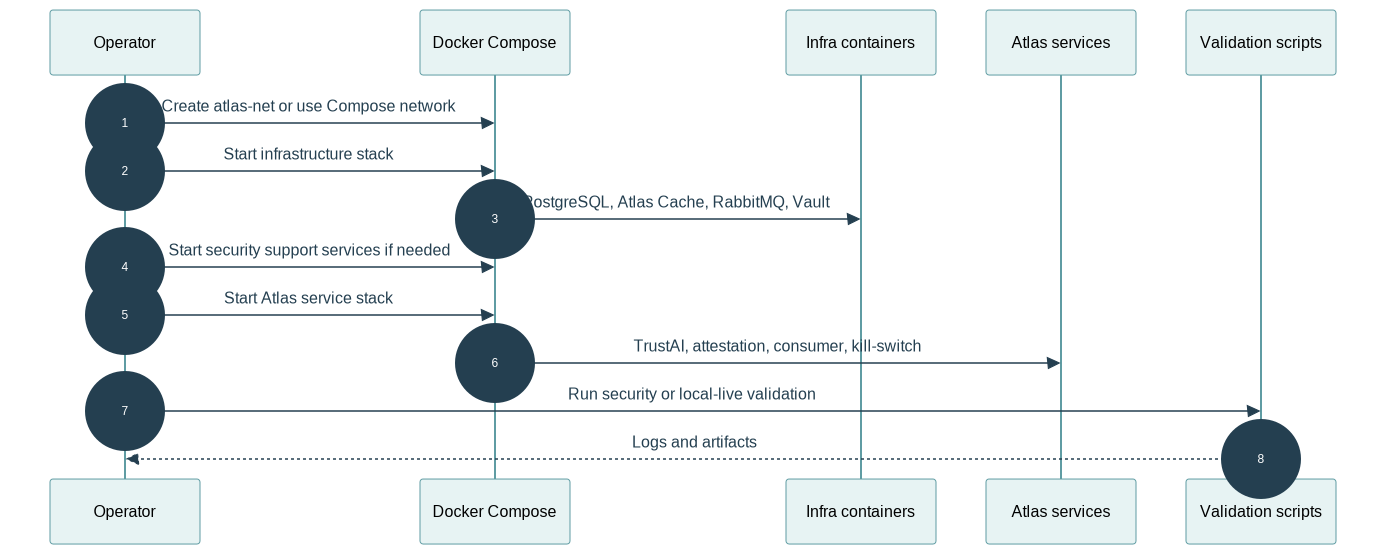
Host Ports To Review
| Port | Component | Default exposure | Review requirement |
|---|---|---|---|
5433 |
Atlas PostgreSQL from |
Host loopback or host interface depending on Docker configuration. |
Restrict to local development; do not expose database ports in shared deployments. |
6380 |
Atlas Cache from |
Mapped to host. |
Require authentication, TLS proxy, and network restriction before shared use. |
5673, 15673 |
RabbitMQ AMQP and management UI |
Mapped to host. |
Use non-default credentials and restrict management UI access. |
8201 |
Vault dev listener |
Mapped to host. |
Dev mode only. Replace with initialized and unsealed Vault for real deployments. |
8443, 18480, 16379, 16389 |
Local-live HTTPS/federation/firewall/cache/directory surfaces |
Loopback-bound by the validation Compose file. |
Local validation only. |
Validation
RUN_ID="$(date -u +%Y%m%d-%H%M%S)-docker-validation"
EVIDENCE_DIR="artifacts/deployment/docker-lab/$RUN_ID"
mkdir -p "$EVIDENCE_DIR"

docker compose -f docker/atlas-infrastructure.yml ps | tee "$EVIDENCE_DIR/atlas-infrastructure.ps.txt"
docker compose -f docker/trustscore-services.yml ps | tee "$EVIDENCE_DIR/trustscore-services.ps.txt"
./scripts/check-host-exposed-services.sh 2>&1 | tee "$EVIDENCE_DIR/host-exposure.log"
REPORT_ROOT="$EVIDENCE_DIR/security-validation" ./scripts/run-security-validation.sh 2>&1 | tee "$EVIDENCE_DIR/security-validation.console.log"
REPORT_ROOT="$EVIDENCE_DIR/local-live-validation" ./scripts/run-local-live-validation.sh 2>&1 | tee "$EVIDENCE_DIR/local-live-validation.console.log"
Use ./scripts/run-local-live-validation.sh --keep-running when a human needs to inspect the UI after automated validation. Use docker compose logs --no-color <service> for evidence capture, then redact credentials before sharing.
Expected result: run-security-validation.sh and run-local-live-validation.sh exit zero, host exposure output has no unexpected broad bindings, and any skipped live sub-check is excluded from deployment claims.
Backup And Recovery
Docker backup and restore is appropriate for developer, lab, and controlled demonstration deployments. Capture Compose configuration, named volumes, database dumps where needed, image digests, logs, and evidence artifacts before restore testing. Do not promote generated local-live certificates, Vault dev state, or sample credentials as durable operational state. Use Backup And Recovery: Docker Lab Runbook for the deployment-specific checklist.
Stop, Roll Back, Or Reset
Stop the service layer before the shared infrastructure layer:
docker compose -f docker/trustscore-services.yml down
docker compose -f docker/atlas-infrastructure.yml down
For a destructive lab reset that removes named volumes:
docker compose -f docker/trustscore-services.yml down -v --remove-orphans
docker compose -f docker/atlas-infrastructure.yml down -v --remove-orphans
Expected result: docker compose ps shows no running containers for those files. A destructive reset removes local database, cache, queue, and Vault dev state; keep evidence and backups before running it.
Troubleshooting
| Symptom | Command | Disposition |
|---|---|---|
Port already bound |
|
Move the binding in the Compose file for the lab run or stop the conflicting local service. |
Container is unhealthy |
|
Preserve logs, fix the dependency or configuration issue, and rerun validation. |
Service stack cannot reach infrastructure |
|
Confirm both Compose stacks attach to |
Validation fails after stack changes |
|
Treat failures as findings and skipped checks as unsupported claims until rerun evidence exists. |
Hardening Checklist
| Area | Required action before shared or enterprise use |
|---|---|
Secrets |
Replace dev passwords, Vault dev tokens, generated local certs, and sample keys with environment-owned secrets. |
Network |
Remove unnecessary host port bindings, bind administrative services to loopback or private networks, and document every exposed port. |
Images |
Pin images by digest where required, scan images, and record provenance. |
Persistence |
Map volumes to approved storage, document backup/restore, and test recovery. |
TLS and identity |
Replace local generated certs with environment trust material and validate client/server authentication. |
Evidence |
Run security validation after every change and record skipped checks explicitly. |