
User and operator guide · Operations
Define Application Connectors (No-Code)
On this page
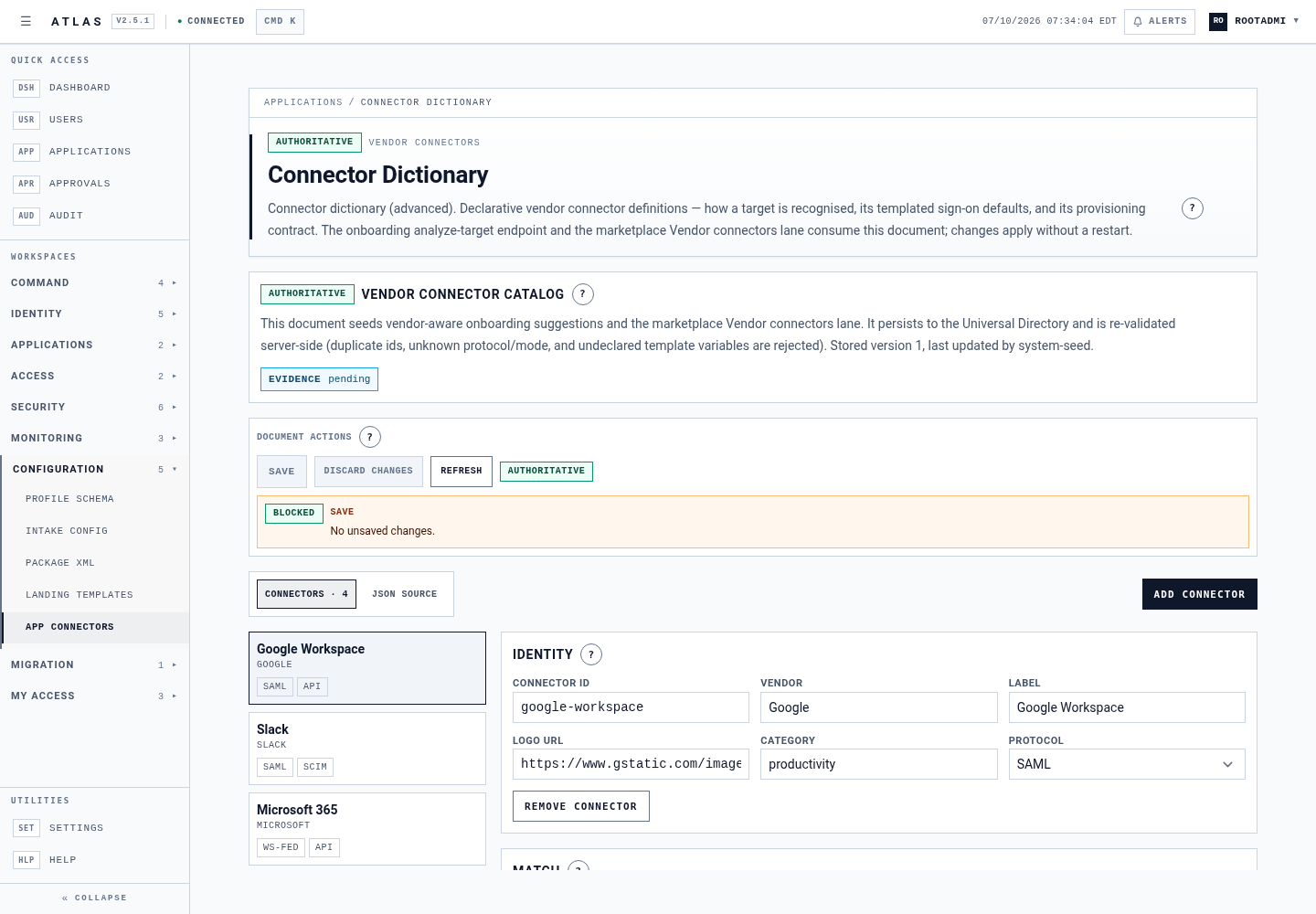
Use This Page WhenBefore You BeginWhat You Will DoProcedureOpen the dictionaryDefine a connectorUnderstand the validationKnow what consumes itVerifyTroubleshootingRelated PagesUse the connector dictionary to teach Atlas about a vendor once — its match patterns, sign-on templates, and provisioning contract — so the onboarding wizard and the marketplace recognise that target and prefill its defaults for every operator afterward.
Use This Page When
-
Add or edit a vendor connector so onboarding recognises a target and prefills its sign-on and provisioning defaults.
-
Declare the
{variables}an operator must supply for a vendor (for example a primary domain). -
Fix a connector whose templates leave highlighted gaps in the onboarding wizard.
Before You Begin
| Requirement | What to verify |
|---|---|
Access |
Configuration → APP CONNECTORS ( |
Runtime |
The gateway is up. Saves are hot-reloaded — no restart is required. |
Configuration |
The vendor’s real ACS URL, entity ID, and SCIM base URL, and which of those values are per-tenant |
Evidence boundary |
Atlas validates the shape of the document. It does not prove the vendor’s endpoints are live or correct — that is deployment-owned. |
What You Will Do
-
Open the dictionary and pick or add a connector.
-
Declare how a target is recognised (match patterns).
-
Fill the sign-on and provisioning templates, declaring every
{variable}. -
Save — the change hot-reloads into onboarding and the marketplace.
Procedure
Open the dictionary
-
Open Configuration → APP CONNECTORS (
/applications/connector-dictionary). Editing requiresconfiguration.manage. -
The dictionary is a document on the Universal Directory configuration domain
application-connectors, seeded with Google Workspace, Slack, Office 365, and GitHub. Edit each connector form-first, or toggle the JSON view for the raw document.
Define a connector
-
Match. Declare how a target is recognised:
domains,metadataUrlPatterns, and/orissuerPatterns. The onboarding probe scores a candidate target against these. -
Sign-on. Fill the templated defaults — ACS URL, entity ID, redirect, NameID format, and attribute mappings — using
{variable}placeholders (for examplehttps://www.google.com/a/{domain}/acs). -
Provisioning. Declare the contract — the SCIM base-URL template, the auth style, and the attribute schema mapping each Atlas source attribute to a SCIM path.
-
Variables. Declare every
{placeholder}used anywhere in the templates under the connector’s variables, each with a label and example, then add markdown instructions for the onboarding operator. -
Save. The document persists through
PUT /api/v1/configuration/application-connectorsand hot-reloads — the onboarding analyze-target endpoint and the marketplace Vendor connectors lane pick up the change within seconds.
Understand the validation
The server rejects a malformed save with named findings:
| Finding | Meaning |
|---|---|
Duplicate connector id |
Connector ids must be unique across the dictionary. |
Unknown protocol / provisioning mode |
The protocol and provisioning |
Undeclared template variable |
Every |
Unparseable URL template |
A URL-shaped template must parse once its placeholders are neutralised. |
Know what consumes it
-
The marketplace Vendor connectors lane renders an Add <vendor> tile per connector and launches the wizard at
/applications/onboarding?connector=<id>. -
The onboarding analyze-target probe matches a pasted domain, metadata URL, or issuer against the connector’s match patterns.
-
Both prefill the wizard: resolved variables become a safe prefill, while unresolved placeholders are surfaced as highlighted gaps for the operator to complete.
Verify
| Check | Passing result |
|---|---|
Saved and reloaded |
The save reports |
Validation holds |
A save with a duplicate id or an undeclared |
Prefill works |
Add <vendor> opens |
Troubleshooting
| Symptom | Likely cause | Operator action |
|---|---|---|
Save rejected: |
A template uses |
Add |
Save rejected: duplicate id or unknown mode. |
Two connectors share an id, or a |
Make the id unique, or set a supported protocol/provisioning mode. |
The editor is read-only. |
The session lacks |
Obtain the manage capability, then reopen the editor. |
The vendor tile is missing from the marketplace. |
The lane renders the reloaded document; the save may not have committed. |
Confirm the save succeeded, then reload the marketplace so it re-reads the dictionary. |
Related Pages
-
Use The Apps Marketplace — the Vendor connectors lane that renders an Add <vendor> tile from each definition here.
-
Application Onboarding Practitioner Guide — the wizard this dictionary prefills through the analyze-target probe.
-
Browse The Application Catalog — where the applications you onboard from these connectors are published.
-
Manage System Configuration — how Universal Directory configuration domains are edited and hot-reloaded.