
User and operator guide · Operations
Manage Certificates
On this page
Use This Page WhenBefore You BeginWhat You Will DoProcedureRead the inventoryRotate the SAML server signing key (guided, zero-downtime)Rotate a per-application signing keyRevalidate a federation partner’s certificatesVerifyTroubleshootingRelated PagesUse the certificate workbench to see every certificate Atlas issues or serves in one inventory, and to rotate a SAML signing key without breaking service-provider trust.
Use This Page When
-
Review certificate expiry, fingerprints, and trust status across the whole platform.
-
Rotate the SAML IdP server signing key (or a per-app signing key) ahead of expiry, with no downtime.
-
Diagnose why a service provider (SP) is rejecting signatures after a rotation.
Before You Begin
| Requirement | What to verify |
|---|---|
Access |
Security → CERTIFICATES ( |
Runtime |
The gateway is up. For a staged rotation the target SP must be reachable so it can pre-trust the staged key. |
Configuration |
Know which SP pins the active signing certificate — that is the party the drift check watches. |
Evidence boundary |
Atlas proves the inventory, the rotation sequence, and its own drift check. The SP’s trust decision and external CA issuance are out of scope. |
What You Will Do
-
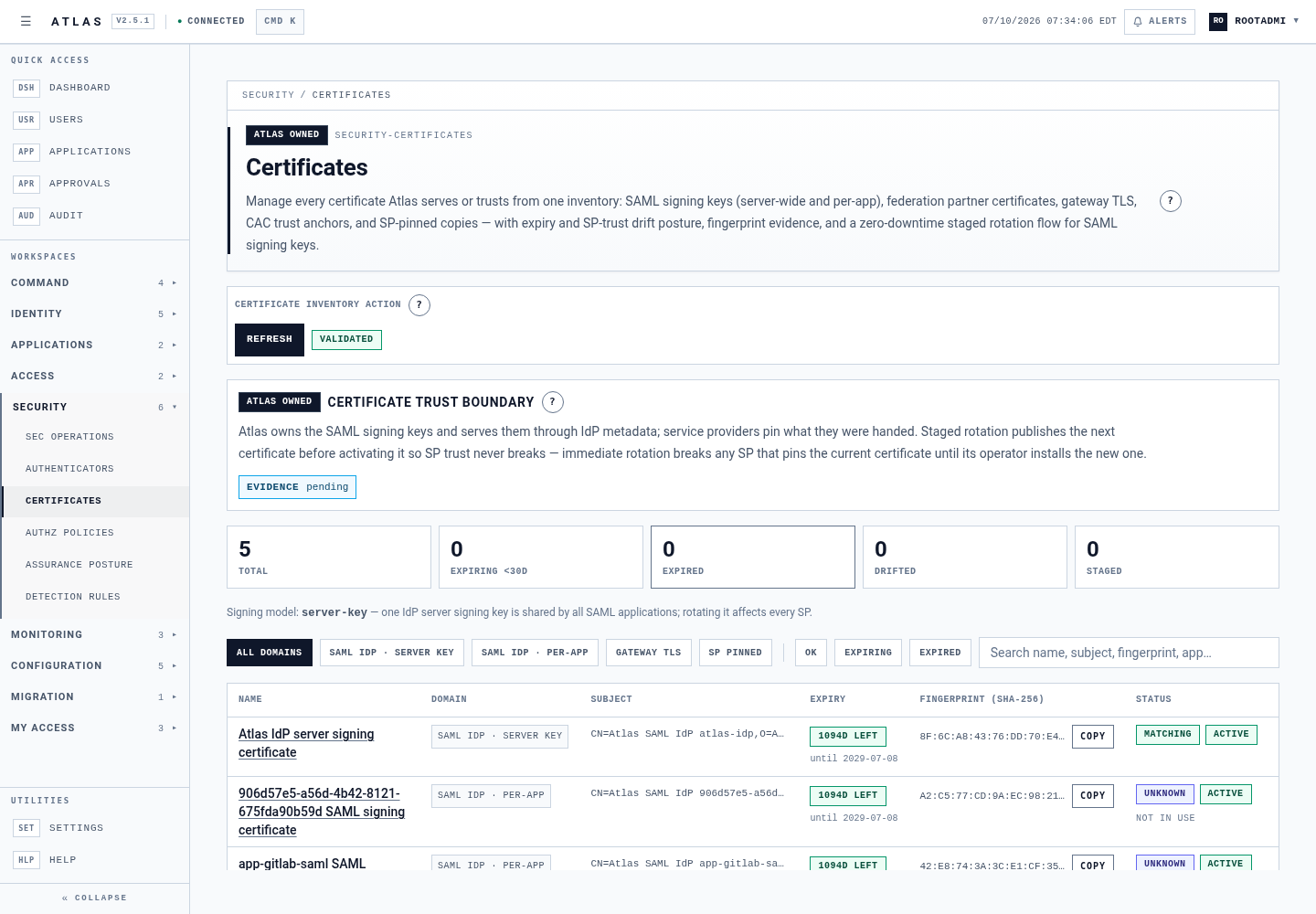
Open the inventory and read expiry, fingerprints, and trust status.
-
Stage the next signing key so the SP can pre-trust it.
-
Install it at the SP and confirm the pin matches the staged key.
-
Activate — the previous key retires.
Procedure
Read the inventory
-
Open Security → CERTIFICATES. Viewing requires
security.certificates.readat AAL2. -
The unified inventory (
GET /api/v1/security/certificates) lists SAML IdP server and per-application signing keys (in active, staged, and retiring slots), federation partner metadata certificates, the gateway TLS certificate, CAC trust anchors, and SP-pinned certificates. -
For each row read the days-to-expiry status (
ok,expiringunder 30 days, orexpired), the SHA-1 and SHA-256 fingerprints, and the trust status (matchingordrifted). Download the PEM when you need the raw certificate.
Rotate the SAML server signing key (guided, zero-downtime)
Rotation requires security.certificates.manage. The guided path keeps SP trust intact:
-
Generate next.
POST /api/v1/security/certificates/saml-server/stagemints the next signing key into the staged slot and publishes it in the IdP metadata, so an SP can pre-trust it before it ever signs. -
Install at SP. Refresh the SP’s copy of the IdP metadata (or download the staged PEM and load it). Atlas runs a live
pinnedMatchesStagedcheck so you can confirm the SP now trusts the staged key. -
Activate.
POST /api/v1/security/certificates/saml-server/activatepromotes the staged key to active; the previous key moves to the retiring slot. -
To abandon a staged key before activation,
POST /api/v1/security/certificates/saml-server/cancel-stage.
|
Important
|
Rotate immediately ( |
Verify
| Check | Passing result |
|---|---|
Staged |
After stage, the key shows a populated staged slot and the IdP metadata carries both the active and the staged certificate. |
Pre-trust |
After the SP refreshes metadata, the live |
Activated |
After activate, the previous certificate sits in the retiring slot and the active row reads |
Audited |
Every |
Troubleshooting
| Symptom | Likely cause | Operator action |
|---|---|---|
A row reads |
The certificate is at or past end of life. |
Stage and activate a replacement using the guided rotation above. |
Trust status stays |
The SP still pins the retiring certificate. |
Refresh the SP’s IdP metadata (or re-pin the new certificate) so |
A rotation verb returns |
The session is below AAL2 or lacks |
Step up to AAL2 and confirm the capability, then retry. |
Immediate rotate is refused. |
The |
Resend with body |
Related Pages
-
Application Onboarding Practitioner Guide — where SAML sign-on and IdP metadata are configured for the apps whose signing keys you rotate here.
-
DDIL Federation And Replay — federation partners whose metadata certificates appear in this inventory.
-
Manage Authorization Policies — where the
security.certificatescapabilities and the AAL2 requirement are set. -
Read The Live Audit Log — every staged rotation and activation is recorded there in real time.